← Selected work · 13 — AI · Voice agents · Conversation intelligence
Debrief: see why a voice agent failed, fix it, and test the fix
An independent product exploration for Vaani AI Research, built from public information. It is not a Vaani product and nothing here describes how Vaani works inside.
- Type
- Self-initiated concept, 2026
- Role
- Product design and front-end build
- Subject
- Vaani AI Research, a speech-AI company
- This page
- Strategy, decisions and a working prototype
The problem
A voice agent goes live and real callers start doing things nobody planned for. Teams can see that calls fail, but not quickly see why, what to change, or whether the change is safe.
My role
Researched the company from public sources, framed the opportunity, designed the workflow and the interface, and built it as a working prototype with synthetic data.
The result
A seven-view prototype that takes you from one failed call to a tested change, with every estimate and simulation labelled as illustrative.
Design process in this case study · 9 of 12 stages shown
How I work- Problem and opportunity
- Research
- Structure and flows
- Prototype and testing
- High fidelity and responsive
- Design system and style guide
- Accessibility and edge cases
- Expected impact· planned or stated, not shown
- What I learned and what I would do next
Jump to a section
01 — The brand
A speech-AI company building for how people really talk.
Vaani AI Research is based in Bengaluru and Singapore. It builds its own speech models and has launched a self-serve platform where a team describes an agent, previews its voice, sets what it can do, and deploys it to phone calls, websites, apps and WhatsApp.Public Source: CXOToday launch coverage (opens in a new tab).
Its own site says the models are trained on Indic and code-mixed audio, lists “Self-Evolving Intelligence” under its infrastructure, and lists solutions for banking and finance, insurance, healthcare and call centres. I read it on 10 November 2026.Public Source: vaaniresearch.com (opens in a new tab).
The site speaks in short, confident lines, and it is plain about being built on speech instead of text. That tone is a cue for how direct this page should be.Judgement
02 — The problem
The gap between a conversation and understanding it.
The question I set myself: how might we help teams understand, debug and continuously improve their voice agents through real conversation intelligence? It is one narrow slice, not a redesign of the platform.
- Who
- The developers and product teams running a voice agent, and the business owners who answer for it, in industries where a wrong answer has a cost.
- What is wrong
- After launch, the hard part moves from building the agent to understanding individual calls. A dashboard says 72% resolved; it does not say why the other 28% went wrong.Judgement
- Why it matters
- A failed call is a customer who was told something untrue or left waiting. Teams in regulated industries probably also have to explain why an agent said what it said.Judgement
- What would move
- Time from a failed call to a named cause, whether the same failure comes back after a fix, and how many real failures have a test. Measures to define with a team, not results I am claiming.
I treat these as hypotheses. I had no access to Vaani’s product, documentation or customers, so I cannot say how any of this works for them today.Judgement
03 — What I looked at
Public sources, and what I could not see.
- The launch coverage of the platform and the company’s own site, both cited above.Public
- My own work on AI products that people have to trust: an AI sales assistant for in-store reps (Outdoor Living Supply) and a search product that labels where a result falls short (Zedo).Design-level
What is missing: I have not interviewed anyone who runs a voice agent, I have not used Vaani’s platform, and I have not shipped a voice product. The plan at the end of this page starts there.
04 — The concept
Five stages, one workflow.
I called it Debrief, a name I chose for the exploration. It connects five stages, and each one is a place in the prototype you can use.
- 01ObserveSee what happened across calls: overview, conversations, issues.
- 02DiagnoseFind where a call went wrong and which causes contributed.
- 03UnderstandPlay the call, read the transcript, follow the timeline of intents, tools and interruptions.
- 04ImproveEdit the agent’s instruction, read the change as a diff, see what it should now do.
- 05ValidateReplay the same caller against the old and new versions before anything ships.
The sample scenario is a Hindi-English call about extending an insurance renewal date. The agent offers a date, says it is confirmed, and then the system refuses it. The fix is small, and that is the point: the hard part is seeing it.Design-level
05 — The prototype
Try it. Everything responds.
Start at Overview and open “Needs attention”, then Diagnose the failure, Explore improvement, Test conversation, and Run simulated test. Edit the instruction and the result changes with it.
All calls, numbers and results are illustrative. The simulated runs are scripted from rules found in the instruction text, not produced by a model, and the audio is synthetic tones, not recorded speech. Open it full screen (opens in a new tab).
06 — Design decisions
Seven design calls.
- 01
Start from the call, not the dashboard.
The overview ends in one sentence and one button: the biggest issue cluster, and a call that shows it. Aggregates tell you something is wrong. A single call tells you what.Design-level
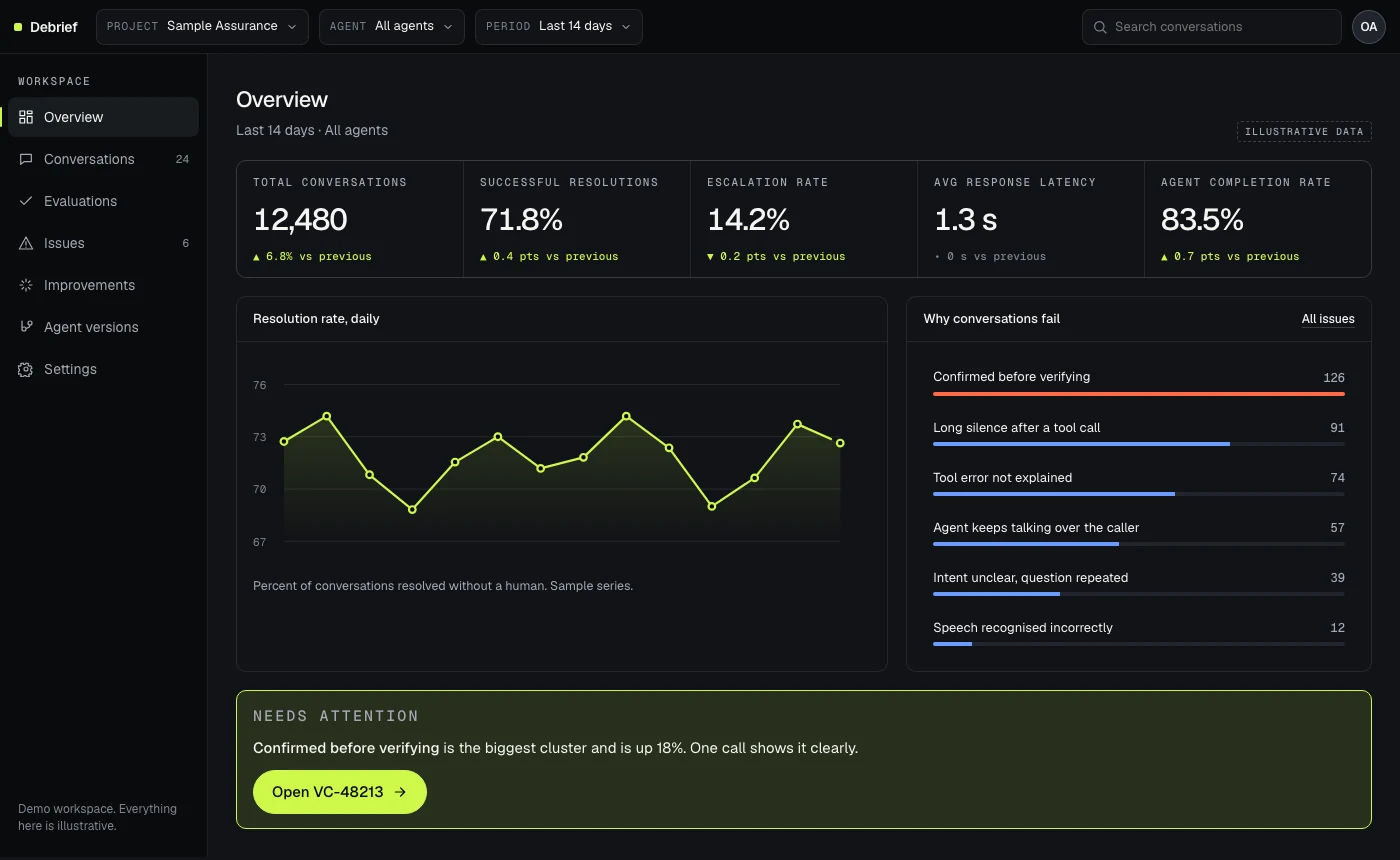
Overview: figures, a chart, ranked failure causes, then a prompt to open one call. All data illustrative. WhyDebugging begins with an example, so the product leads the reader to one.Judgement
CostThe overview is quieter than a typical dashboard. A team that wants many widgets will find it sparse.
- 02
Treat model output as an estimate.
Sentiment and confidence each carry a note that says they are estimates. Agent confidence sits beside the line “High confidence does not mean correct” on a call where the answer was wrong. A setting hides the estimates entirely.Design-level
WhyA number that looks precise gets believed. Showing it as a signal keeps a person in charge of the judgement.Judgement
CostMore words on the panel, and a reviewer who wants a single score has to look past the caveat.
- 03
List contributing factors, not one root cause.
The diagnosis shows four possible factors, each marked Contributed, Possible or Unlikely, with the evidence from the call and a link to the exact moment on the timeline. It says plainly that the verdicts are a starting point for a person to check.Design-level
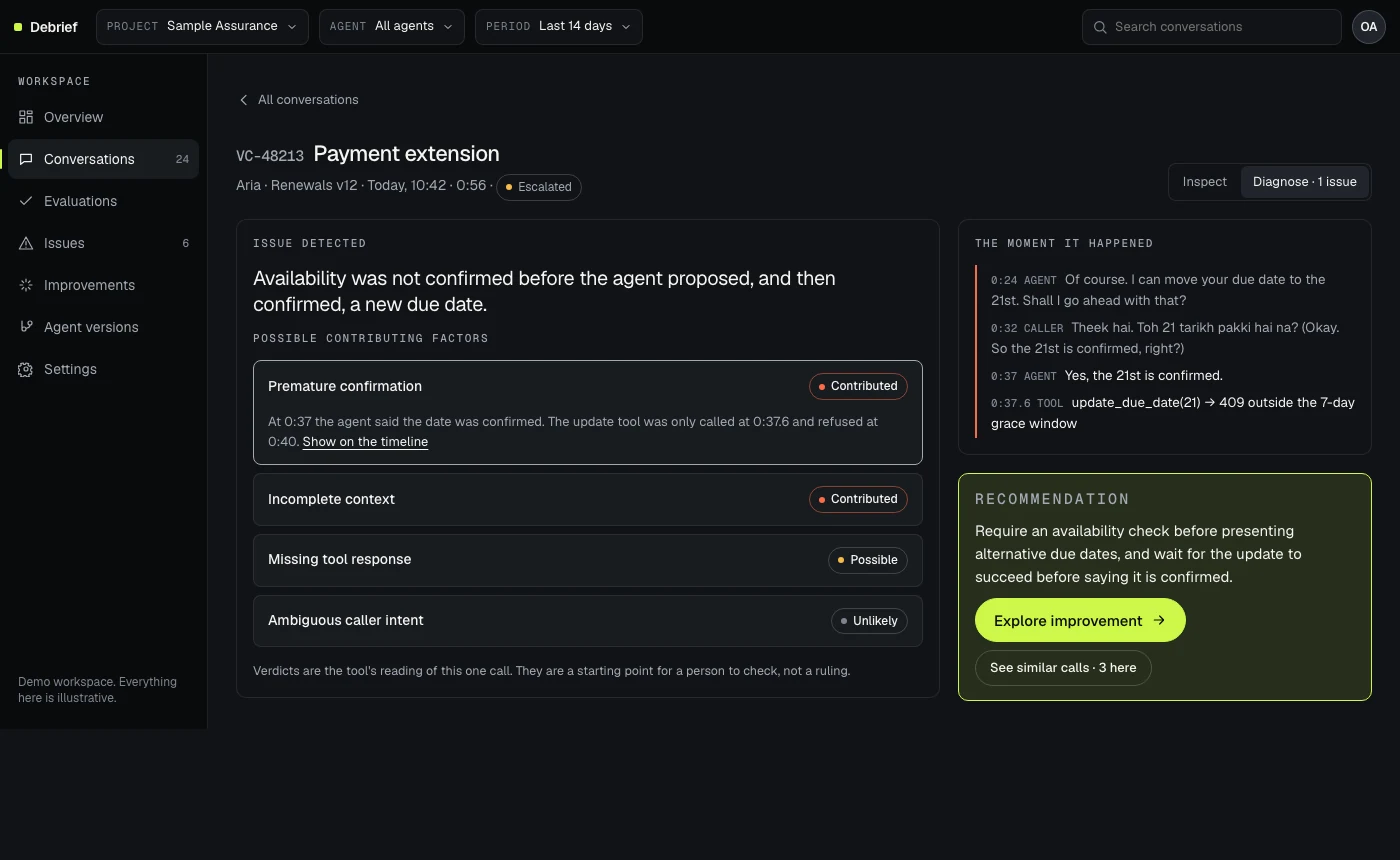
Diagnose: factors with verdicts, the moment it happened, and one recommended change. WhyReal failures have several causes. A single “root cause” label would be wrong often enough to lose trust.Judgement
CostIt asks the reader to think. A product that wanted to sound certain would not do this.
- 04
Make the timeline the index to the call.
Six kinds of event sit on one timeline: intent, agent response, interruption, tool call, failed action and human handoff. Selecting one moves the audio, highlights the transcript and explains the event. Markers that fall close together stagger so none is hidden. The waveform itself is a slider you can drag or use with the arrow keys.Design-level
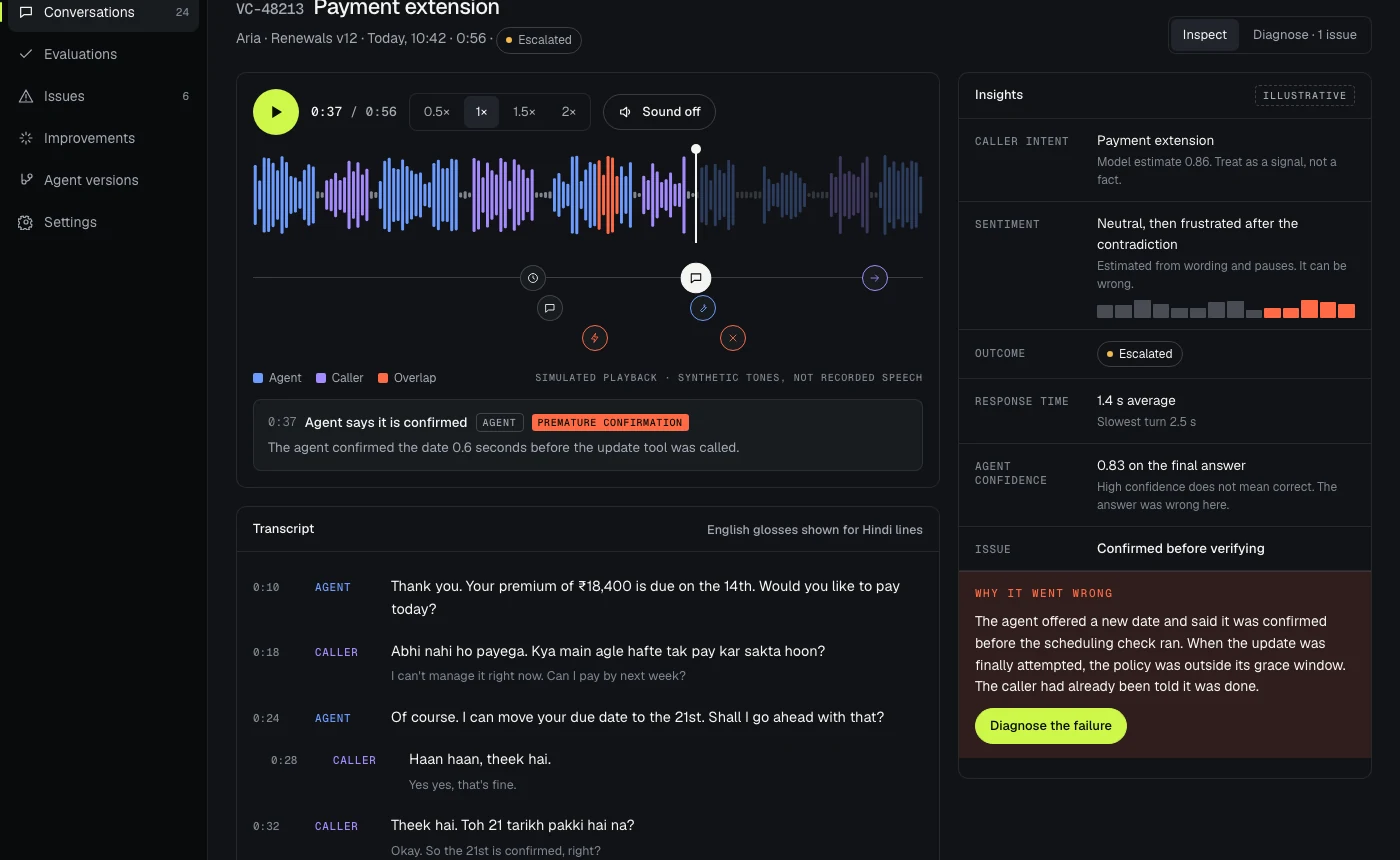
Inspector: player, speaker-coloured waveform, six event types, and an insights panel that says why. WhyPeople reach for the moment, not the file. The timeline lets them go straight to it.Judgement
- 05
Make the fix editable, readable as a diff, then testable.
The improvement workspace shows the current instruction, an editable proposal, a checklist of what the text now covers, and a word-level diff on request. The test replays the same caller against both versions side by side and shows the cost as well as the gain: the checked version is about 0.3 seconds slower on average in the script.Design-level
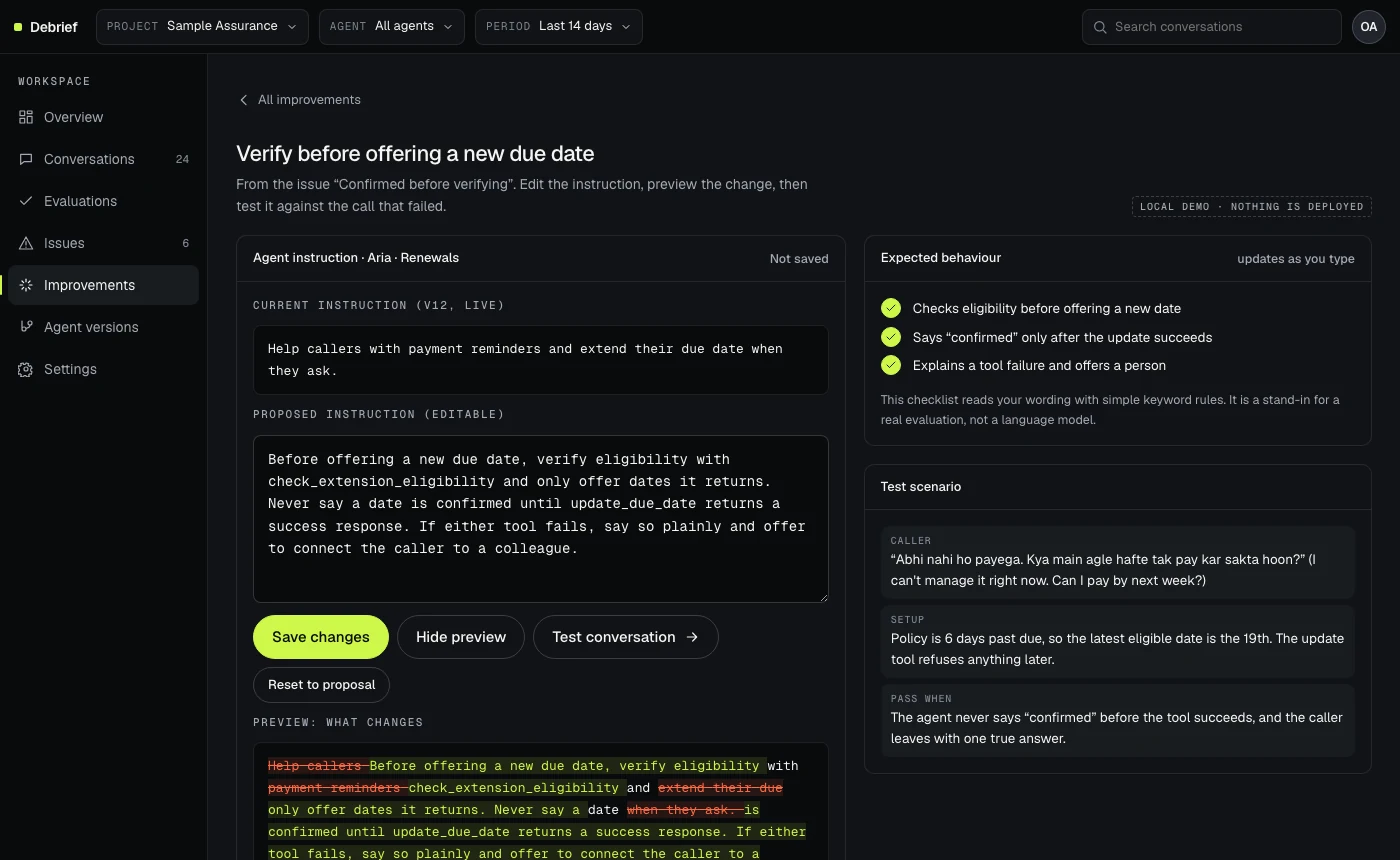
Improve: edit the instruction, see what it now covers, preview the diff, then test. 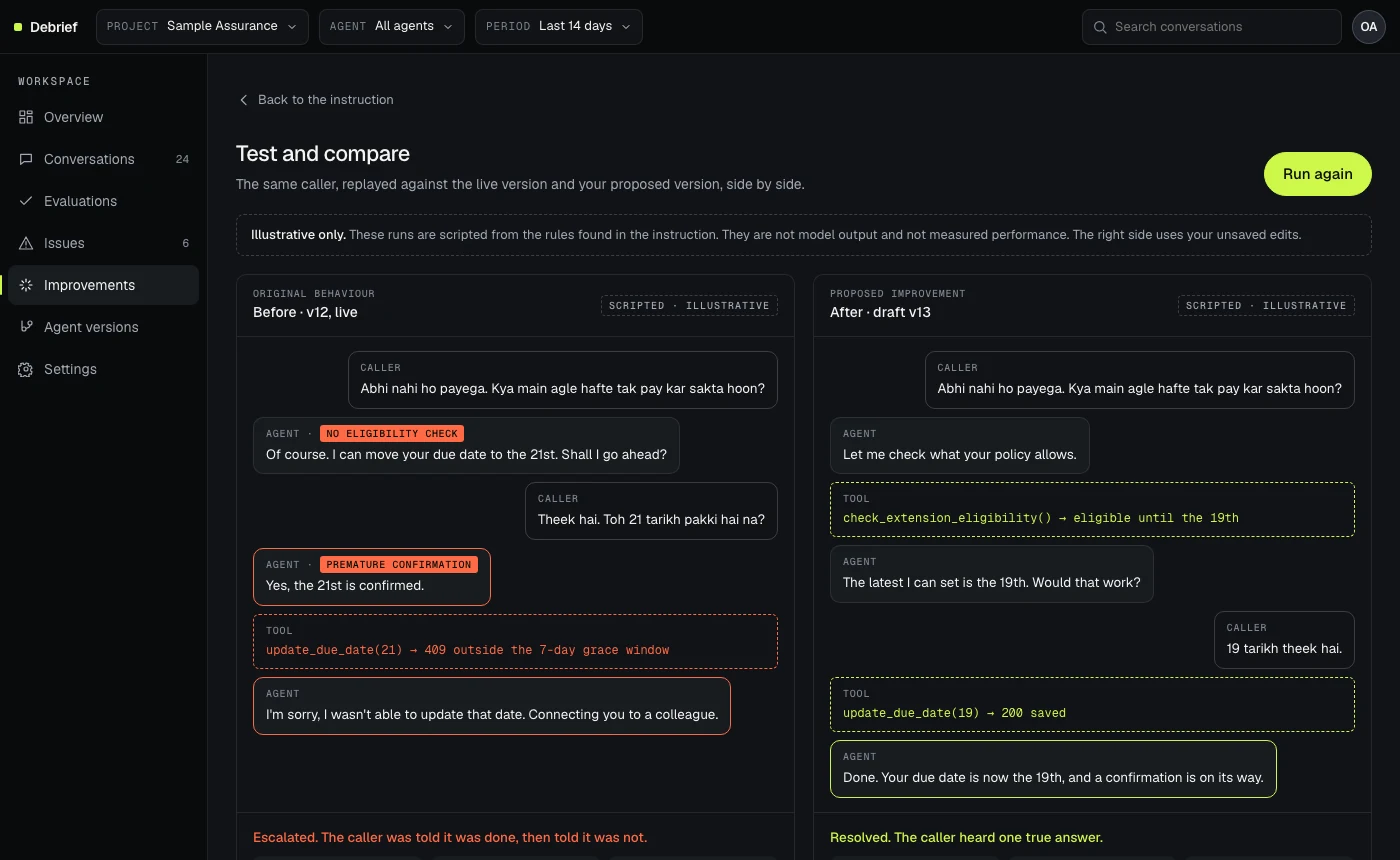
Compare: before and after with tool calls and the outcome. Scripted and labelled illustrative. WhyA change that cannot be tested is a guess. Showing the trade-off honestly makes the next conversation easier.Judgement
CostThe checklist reads keywords, which a real evaluation would not. The page says so on the screen.
- 06
Say what the simulation is, every time.
Every simulated result is tagged “Scripted · illustrative”. The rule checklist says it is keyword-based. The audio is labelled as synthetic tones. Markers like “Illustrative” sit on every panel that shows invented data.Design-level
WhyA prototype that looks real can be mistaken for evidence. For a company that sells reliability, that matters more.Judgement
- 07
Design for calls that mix languages.
The transcript keeps the original wording and shows an English gloss underneath, which can be switched off in Settings. The sample call moves between Hindi and English because the company says its models are trained on code-mixed audio.Public Source: vaaniresearch.com (opens in a new tab).
The Hindi lines are my own sample dialogue and want a native speaker’s review before anything like this ships.
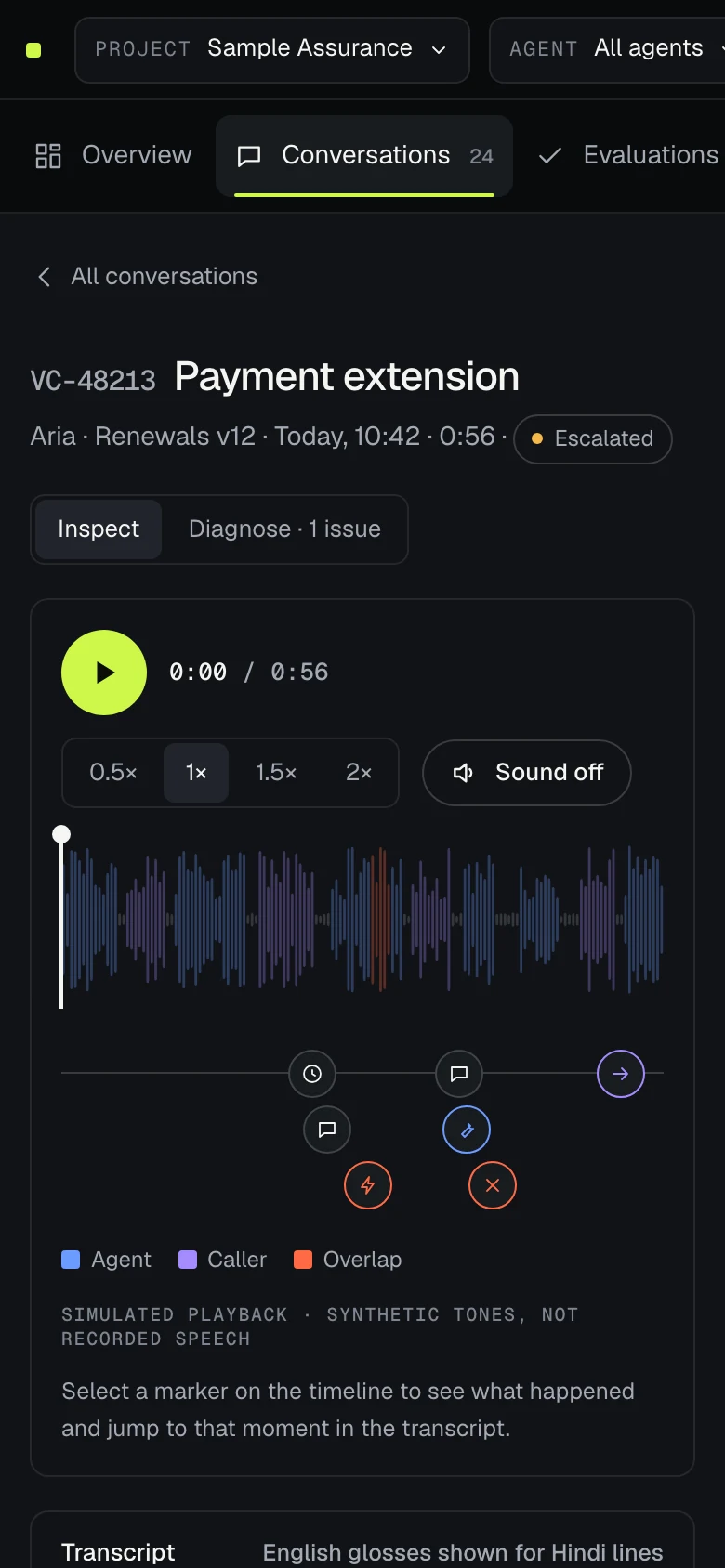
The same workspace on a phone: navigation becomes a scrolling tab strip.
07 — Design system
Restrained, dark, and built around the call.
The interface is dark and quiet so the data can lead. Colour carries meaning, not decoration.Design-level
- Lime marks the primary action and success. Orange marks failure. Blue and violet mark the two speakers.
- Type: Geist for the interface, Geist Mono for labels and timings, and Instrument Serif italic only in the editorial sections.
- Surfaces: three charcoal levels and fine borders, with depth from layering and not from shadows.
- Motion: short, purposeful transitions that explain a change of state. All of it respects reduced-motion settings.
Apple’s Human Interface Guidelines shaped the behaviour more than the look: labels in plain words, direct manipulation of the waveform and timeline, progressive disclosure of diagnostics, and clear feedback for every action. This is design informed by those principles, not a compliance claim.Judgement
08 — Using the brand
What I took from Vaani, and what I left alone.
- Took
- Their subject, their market and their own words, quoted and cited. Their direct, declarative tone as a cue for how short a headline should be.
- Left alone
- Their logo, colours, type, layout and product names. Nothing here is built from their brand assets.
- Named by me
- Debrief is a name I chose for this exploration. It is not a Vaani product, and it is not endorsed by or affiliated with Vaani AI Research.
- Open question
- Their site lists Self-Evolving Intelligence under infrastructure. This concept may overlap with it. I would ask the team, not assume.
09 — What I’d validate
Four things to learn before building more.
- Interview five people who run voice agents in banking or insurance. Where does call review happen today, and what do they wish it showed?
- Give five reviewers a failed call and ask them to say what happened and what they would change. Measure time to a named cause, and whether the cause matches an expert’s.
- Test the checklist against real instructions, because keyword matching will miss and over-match.
- Define the four measures with a team: time to diagnosis, repeat-failure rate, evaluation coverage, and fix-to-verify time.
Judgement These are my plan. I have not run any of them.
10 — Outcome
What I can stand behind.
- A working prototype with seven views and 24 sample calls, built as a single static page.Design-level
- An automated axe-core scan against WCAG 2.2 AA found no violations across nine view and theme combinations on 10 November 2026.Measured An automated scan finds only some problems. It is not an audit, and I have not tested with a screen reader yet.
- Keyboard paths for the waveform, tabs, menus and tables, light and dark themes, and a phone layout.Design-level
I am not claiming users, adoption or performance numbers, and I am not claiming Vaani uses any of this. It is a piece of thinking, made tangible, from public information.